What we drew on the board
The module pages walk each of these ideas through in more depth — this page is the one-glance recap. Click any board to enlarge; use the tags to jump into the matching explainer.
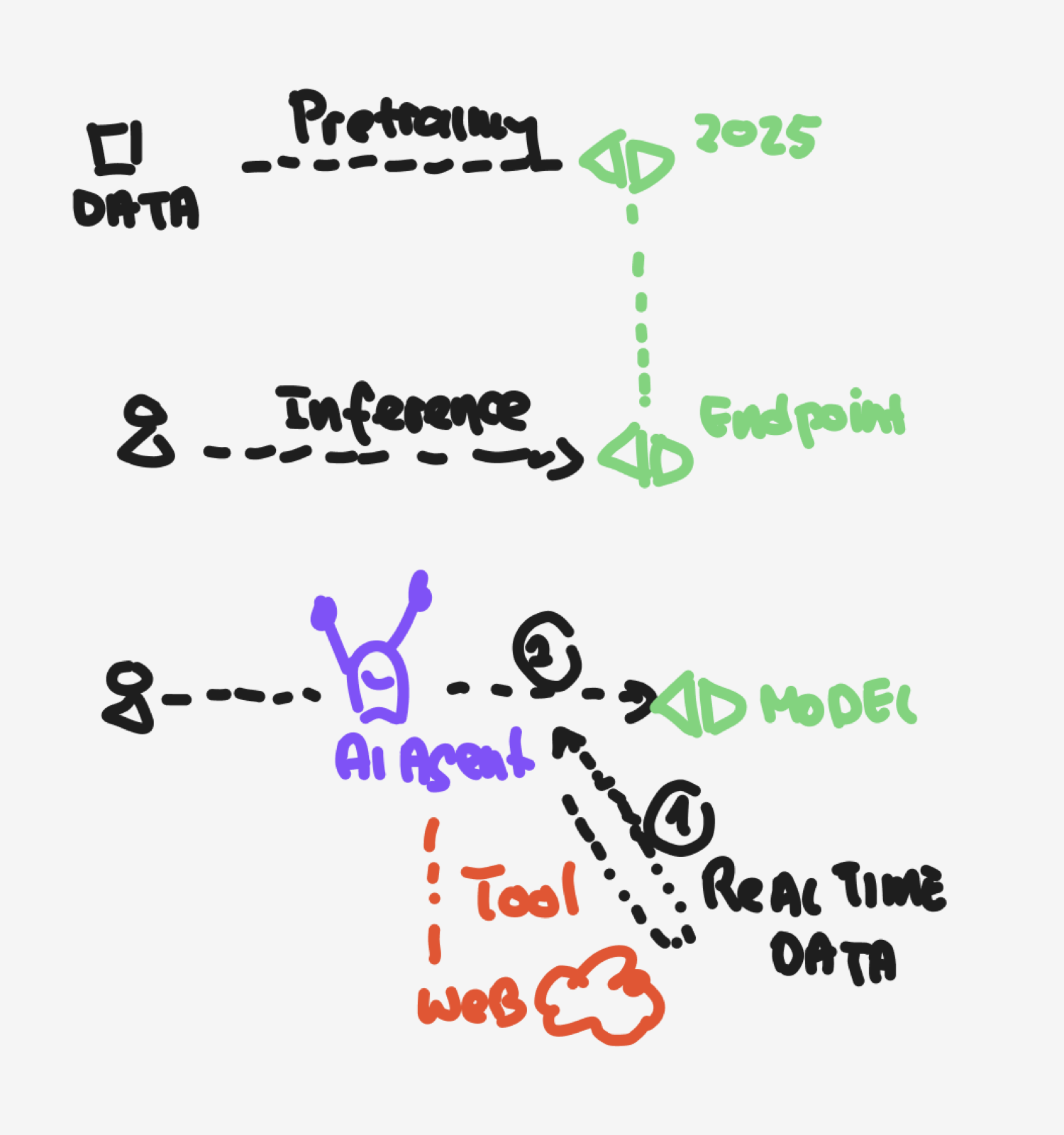
How the model gets built, and how you actually use it
Top row: unlabelled data → pretraining → a model, frozen at a training cutoff (2025 here). Middle row: inference — every message you send goes through the endpoint and comes back. Bottom row: an AI agent wraps the model with a tool so it can reach the web or pull real-time data — the model itself only knows what it was trained on.
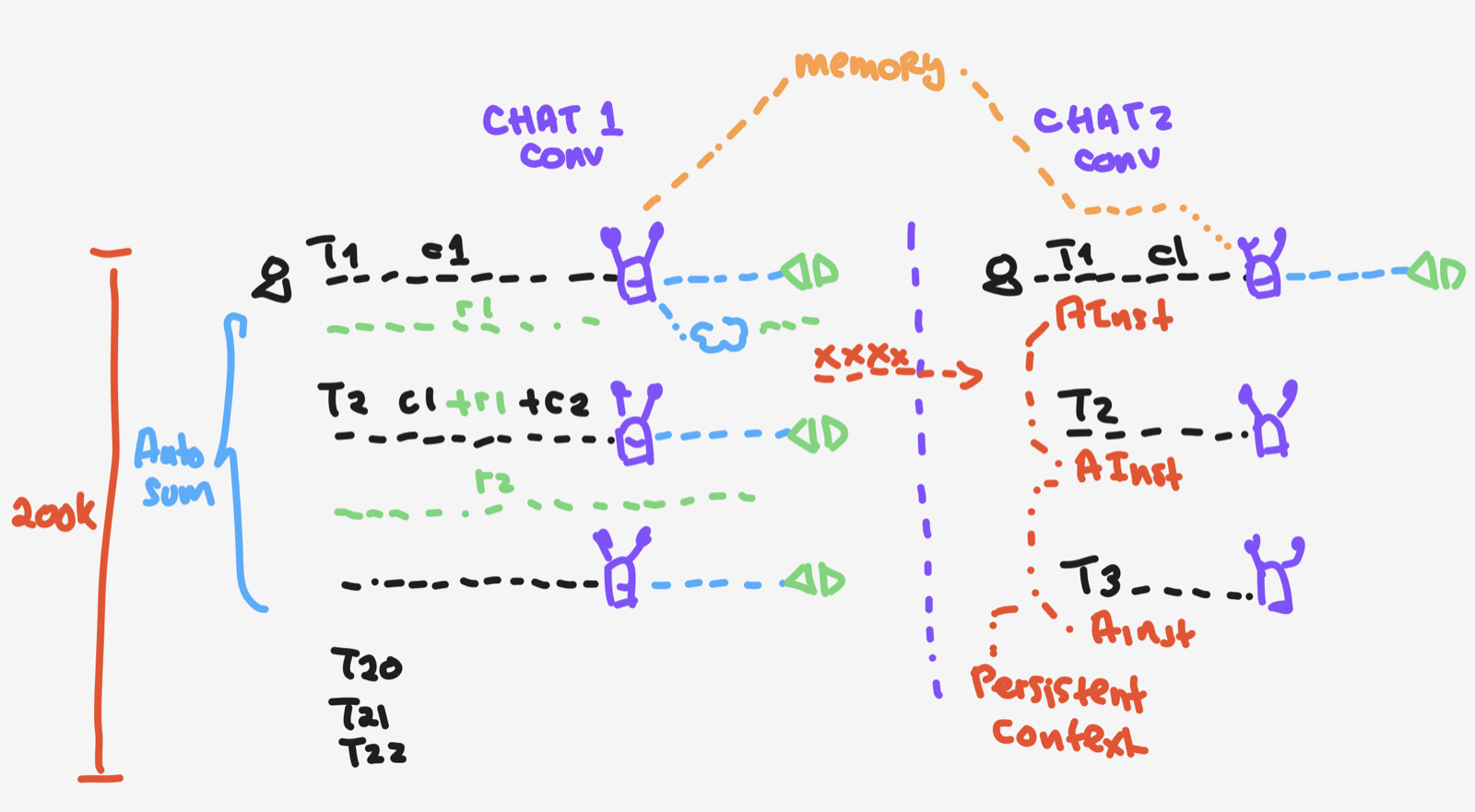
Every turn re-sends the prior thread — the window fills up
Left side (Chat 1): each new turn sends turn 1 + turn 2 + … + the new message. By turn 20+ that thread pushes on the 200K budget shown on the far left. Auto-summary compresses older turns before the window overflows. Right side (Chat 2): the agent's instructions (AInst) ride in on every turn as persistent context. Memory is what an app deliberately carries across chats (the arc across the top).
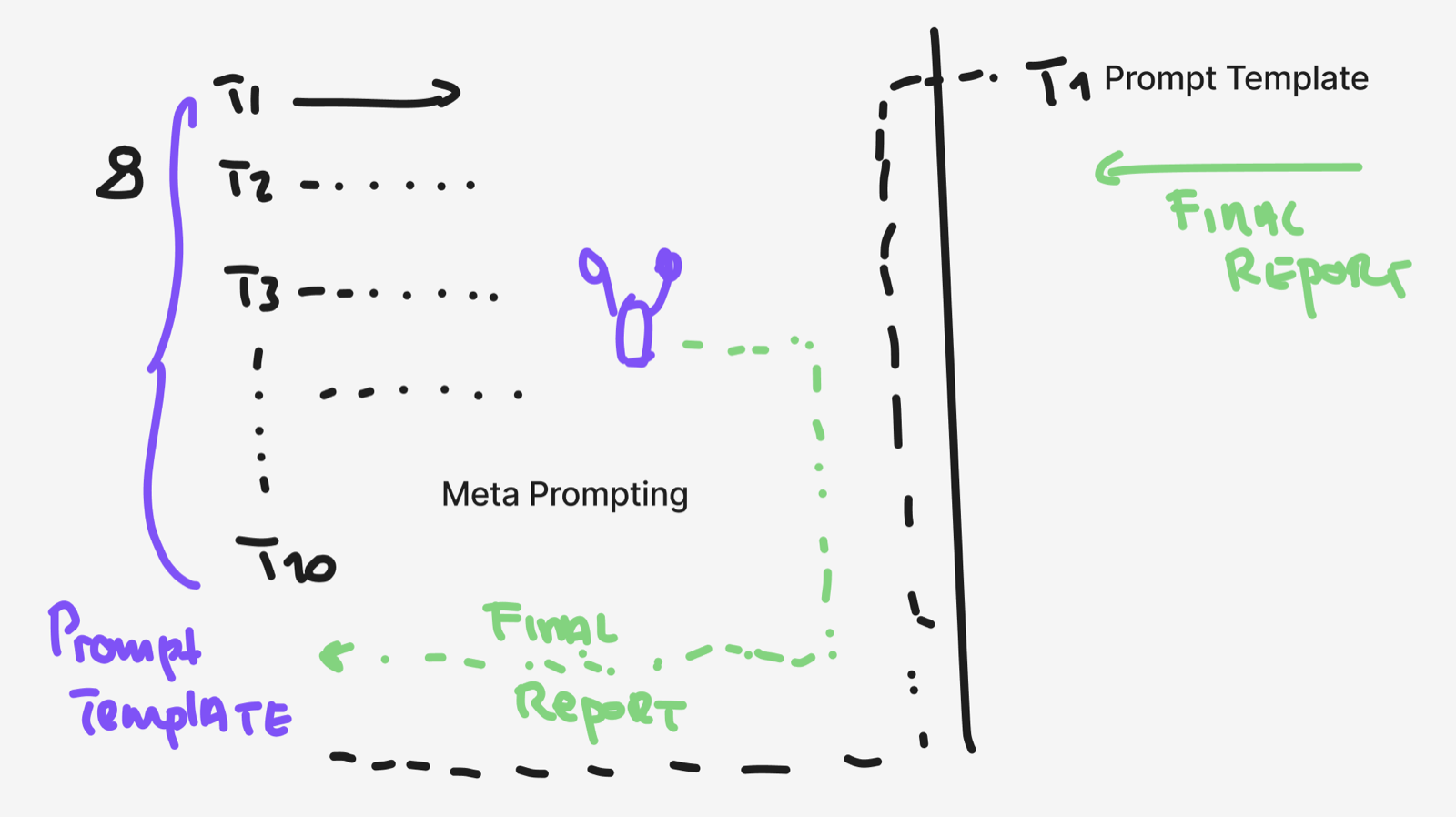
Twenty turns to get it right → save the prompt so next time is one turn
Left: you iterate with the model over T1 … T20, shaping instructions until a Final Report comes out the way you want. Right: those twenty turns collapse into a Prompt Template that produces the same Final Report from a single turn next time. That is meta prompting — using the model to co-write the prompt with you until it becomes a durable asset.
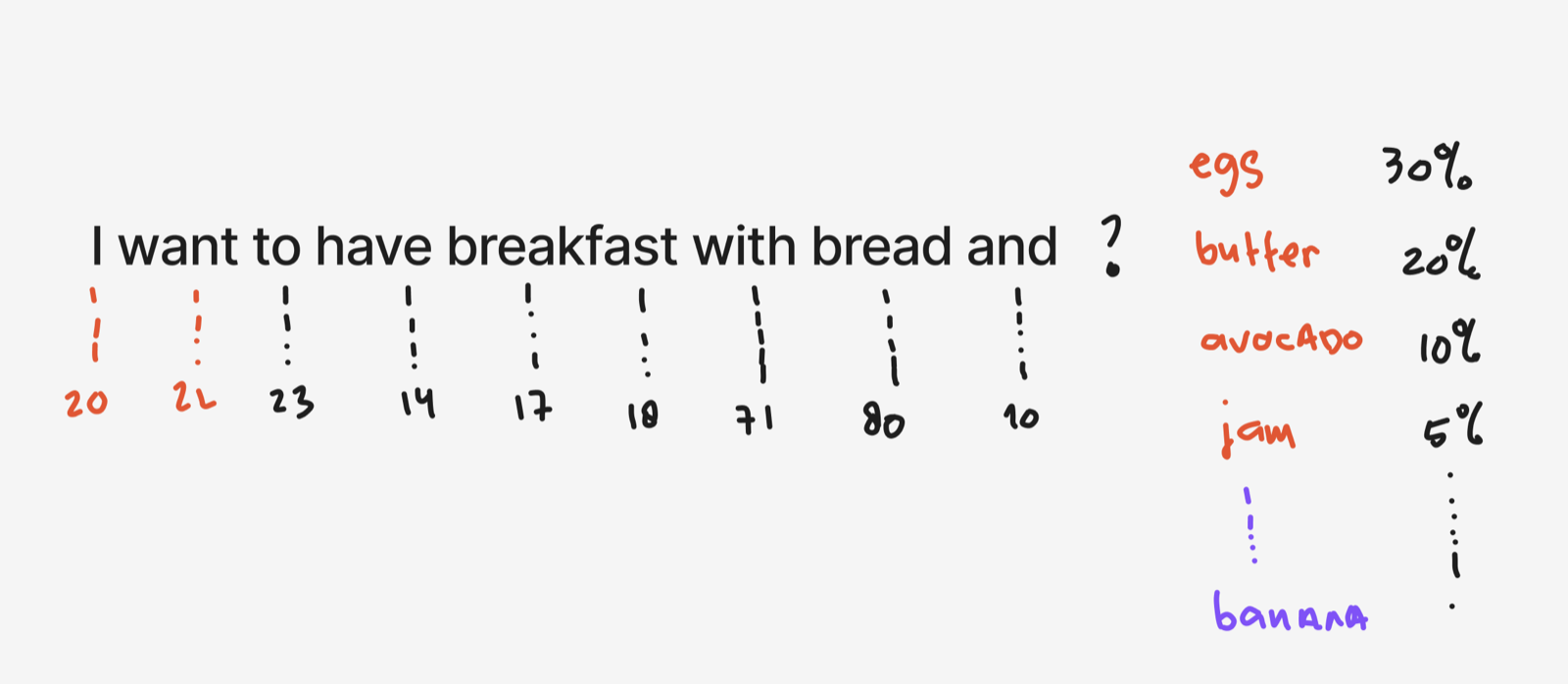
Words become tokens, tokens become numbers, numbers become odds
The sentence "I want to have breakfast with bread and…" is chopped into chunks and each chunk gets an ID (20, 22, 23, 14, 17, 18, 71, 80, 10). Note that breakfast splits into two pieces (17, 18) — common words stay whole, longer or rarer ones get broken up. To decide what comes next the model works out a probability across every word it knows: eggs 30%, butter 20%, avocado 10%, jam 5%, …, and banana far down in the tail. It samples one — that is why the same prompt can give slightly different answers each time.
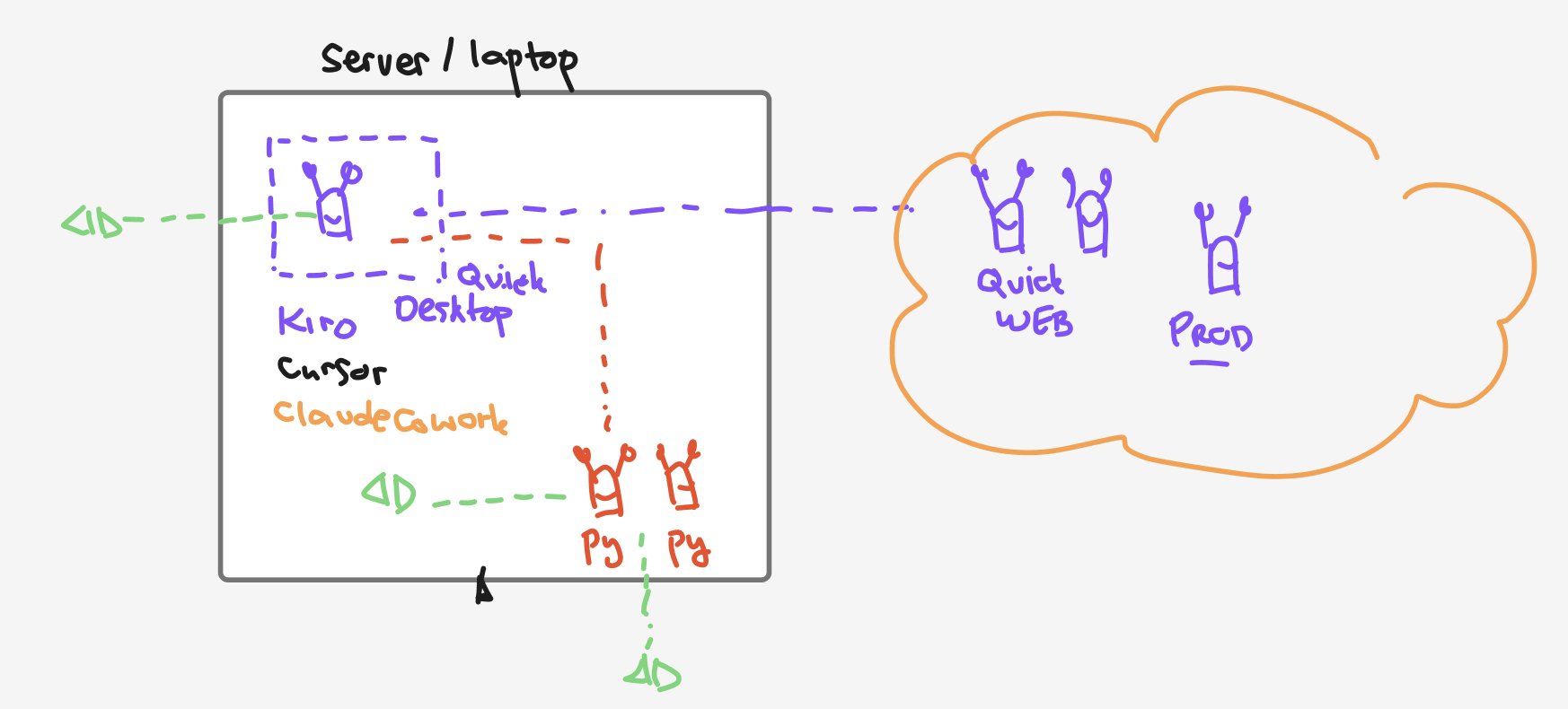
The same agent idea runs on your laptop or in the cloud
Left box — your machine: desktop agent tools (Kiro, Cursor, Claude Cowork, a Quick Desktop app) and your own scripted Python agents (Py). Right — the cloud: Amazon Quick on the web and a hosted production agent. The dashed lines are the point: it is one pattern — a model plus instructions plus tools — just living in different homes and talking to each other across the boundary.
Where each idea lives in the workshop
The whiteboards were shortcuts — a chunk of an idea, drawn fast. The explainers below take each idea further, with interactive walkthroughs, sample data and the framings we did not get to on the board.
| Whiteboard | Go deeper |
|---|---|
| 1 · LLM basics Pretraining · inference · agent |
F1 · From Chatbots to Agents is the fuller version of the bottom row of this board — how a model becomes an agent that acts. |
| 2 · Context window Chat accumulation · memory · persistent context |
Pre-read · LLM Foundations covers the tokens-in / tokens-out picture. Platform · Spaces is where "persistent context" turns into a real feature. |
| 3 · Meta prompting Iterate 20 turns → template → reuse |
F2 · Prompt Engineering gives you the CRAFT framework the template rests on. F4 · Agent Design Canvas is meta prompting for a whole agent, not just one prompt. |
| 4 · Tokenizer Words → tokens → probabilities |
Pre-read · Tokenizer has the exact same sentence as an interactive four-step walkthrough — split, ID, odds, pick. |
| 5 · Where agents live Laptop · cloud · same pattern |
Platform · What is Amazon Quick shows where a Quick agent sits. F4 · Agent Design Canvas is the portable design that can run in any of those homes. |