← Back to Workshop Hub
FOUNDATIONS · RECAP · 10 SEP

Whiteboards from the room

Five ideas we drew on the board during the session — how a model gets built, why the context window fills up, how an agent's instructions persist, how a good prompt becomes reusable, and how the design interview produces something portable. Saved here so you can share them with anyone who missed the day.

Live-session recap · ~6 min read

What We Drew

The module pages walk each of these ideas through in more depth — this page is the one-glance recap. Click any board to enlarge; use the tags to jump into the matching explainer.
1 Model, inference & tools 2 Context window 3 Agent instructions 4 Reusable prompts 5 The design interview
1
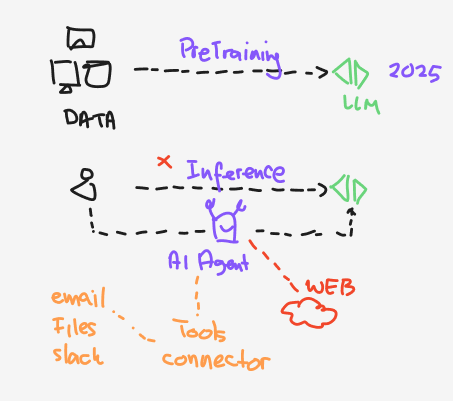
Whiteboard sketch in three rows. Top: a DATA icon feeds a dashed arrow labelled PreTraining into an LLM marked 2025. Middle: a person sends a dashed arrow labelled Inference straight to the LLM, with a small red cross beside the word Inference. Bottom: the same person routes instead through an AI Agent, which reaches the LLM and also reaches out to a red cloud marked WEB. Beneath the agent, an orange label reads Tools connector, with email, Files and Slack listed alongside.
Model, Inference & Tools

The model is frozen — the agent is what reaches out

Top row: data → pretraining → a model, fixed at a training cutoff (2025 on the board). Middle row: inference is you sending a message straight to that model — and the red cross marks its limit, because a frozen model cannot know today's figure or your policy. Bottom row: the same question routed through an agent, which reaches the web and your own systems through tools and connectors — email, files, Slack.
Why it matters: anything that has to be current or yours — this month's numbers, a circular issued last week, your own guideline — arrives through the connector, never from inside the model. When an answer looks confidently wrong, ask first what the agent was actually allowed to read.
2
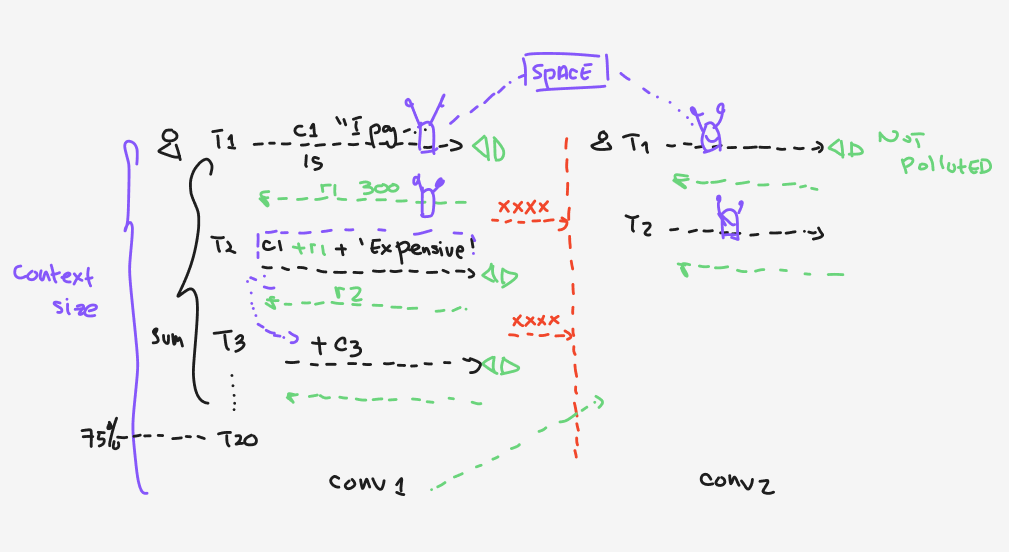
Whiteboard sketch comparing two conversations. On the left, a tall purple bracket labelled Context size spans turns T1 to T20, with 75 percent marked near the bottom. Conv 1 shows T1 sending c1, then T2 sending c1 plus r1 plus a note reading Expensive, then T3 adding c3, each turn returning a reply. A brace labelled Sum marks summarisation across the turns. A red dashed vertical line with crosses separates Conv 1 from Conv 2 on the right, where T1 and T2 run fresh and a green note reads NOT polluted. A purple box labelled SPACE sits above both conversations, connected to each.
Context Window

Every turn re-sends the whole thread — and you pay for it

In conv 1, turn 2 sends turn 1 plus its reply plus the new message, and turn 3 adds more again. The bracket on the left is the context size; by turn 20 the thread is pushing 75% of it, which is where things get slow, expensive and forgetful. Sum is summarisation compressing older turns to buy room. conv 2 starts clean — the red line is deliberate isolation, so the second conversation is not polluted by the first. The Space sits above both, reachable from either.
Why it matters: one conversation per task. If you need something to survive across conversations, it belongs in the Space — not buried in a chat history that the next conversation cannot see and the current one is slowly summarising away.
3
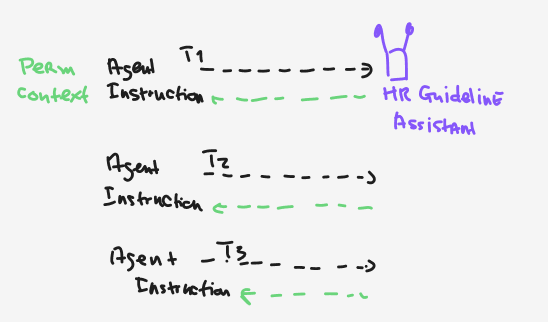
Whiteboard sketch with three stacked rows. Each row shows the words Agent Instruction on the left, then a dashed arrow labelled T1, T2 and T3 respectively going right. The first row points to a figure labelled HR Guideline Assistant, and each row has a green dashed reply arrow coming back. A green label on the far left reads Perm context, spanning the rows.
Agent Instructions

A saved agent re-reads its own brief on every turn

This is the counterpart to board 2. Where a plain chat accumulates history, a saved agent — here the HR Guideline Assistant we built together — carries its instruction in as permanent context at T1, T2, T3 and every turn after. The brief does not fade as the conversation grows, because it is re-supplied rather than remembered.
Why it matters: this is why a saved agent stays consistent where a long chat drifts — and why the wording of the instruction is worth arguing over. It is the one thing the agent sees every single time. Note the platform may reword a persona instruction, so any rule that must survive verbatim belongs in a reference document instead.
4
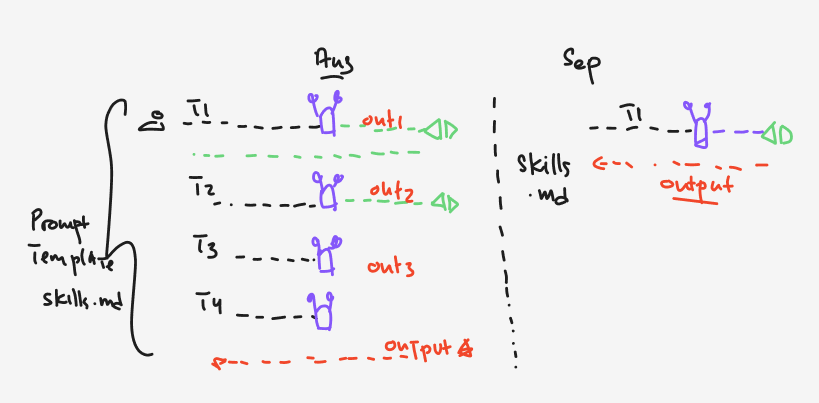
Whiteboard sketch split by a dashed vertical line. The left half is headed Aug: a large brace labelled Prompt Template and skills dot md spans four turns, T1 through T4, each reaching a figure and returning out1, out2, out3, with a red dashed arrow at the bottom labelled output. The right half is headed Sep: a single turn T1 reaches a figure and returns the output directly, with Skills dot md labelled on the left and output underlined in red.
Reusable Prompts

Four turns of wrangling → one turn, once you save it

Left: the way it goes today. You iterate — T1, T2, T3, T4 — each pass producing out1, out2, out3, until the output is finally right. Everything inside that brace is the prompt template you just built by hand without meaning to. Right: the same result from a single turn, because the template was saved as a reusable skill and simply invoked. Same output, a quarter of the effort.
Why it matters: your team's best prompt should be a shared artefact, not one person's chat window that nobody else can find. That is what F4 does at agent scale — the canvas is the durable form of "the prompt we agreed on". The board's Aug and Sep mark where the tooling is heading rather than fixed dates; the habit works today either way.
5
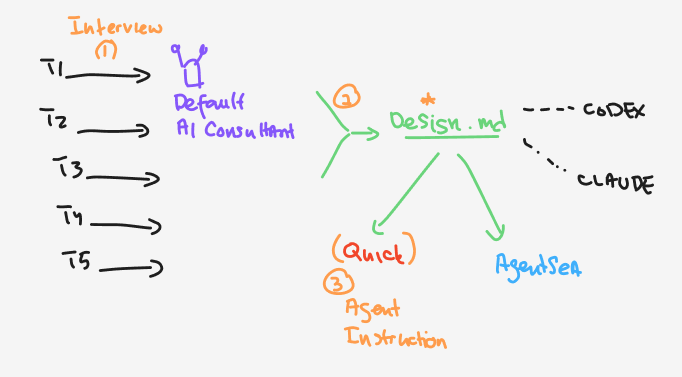
Whiteboard sketch. On the left, five arrows labelled T1 to T5 point right, under an orange heading Interview marked step 1, into a figure labelled Default AI Consultant. A green arrow marked step 2 leads to a file labelled Design dot md in the centre. From that file, arrows fan out: dashed lines to the right towards CODEX and CLAUDE, a green arrow down-left to Quick where step 3 is labelled Agent Instruction, and a green arrow down-right to AgentSea.
The Design Interview

Five questions in, one design out — and it outlives the tool

Step 1: instead of writing a canvas from a blank page, you let the assistant interview you — five turns, one per CRAFT slot, each with options you can just pick from. Step 2: what comes out is a design document, not a chat log. Step 3: that design becomes the agent instruction you paste into the platform you are building on.

Why it matters: the arrows fanning out of Design.md are the whole point of the day. The design is the asset, and it is portable — the same document briefs a coding assistant, a different chat platform, or the internal platform your team lands on next year. We built on Amazon Quick, but nothing you wrote is stranded there.

Where each idea lives in the workshop

The whiteboards were shortcuts — a chunk of an idea, drawn fast. The explainers below take each one further, with interactive walkthroughs, sample data and the framings we did not get to on the board.

WhiteboardGo deeper
1 · Model, inference & tools
Pretraining · cutoff · connectors
F1 · From Chatbots to Agents is the fuller version of the bottom row — how a model becomes an agent that acts, and what "autonomy" actually means when you write it down.
2 · Context window
Thread growth · summarisation · isolation
Pre-read · LLM Foundations covers tokens in and out. Platform · Spaces is where "shared across conversations" becomes a real feature rather than a diagram.
3 · Agent instructions
Permanent context · consistency
F3 · Guideline Assistant is the agent on this board. Platform · Facts vs Rules shows the same rule living in two places — reworded in the instruction, preserved verbatim in a reference document.
4 · Reusable prompts
Iterate → template → invoke once
F2 · Prompt Engineering gives you the CRAFT framework the template rests on. F4 · Agent Design Canvas is the same move for a whole agent.
5 · The design interview
Five rounds → a design → any platform
F4 · Agent Design Canvas holds the interview prompt itself — copy it, paste it, and it asks you the five questions again for your next workflow.